Printing: Supports
It’s not always the case that a model can be printed on an FDM printer as it is. You already know that under certain circumstances, you can print things into thin air. But how to do it when it’s not a bridge?
One option is to print supporting structures under the object, supports, or more often in English support. Today’s exercise is about that.
To print with supports, this functionality needs to be explicitly enabled in OrcaSlicer on the Support page.
OrcaSlicer can detect where support is needed by itself, you just need to tell it what our printer can still handle. This depends on various circumstances, such as print speed, printing material properties, ambient temperature, and active cooling.
Types of Supports
This information was already mentioned in slicing.
There are two main types of supports:
Standard Supports

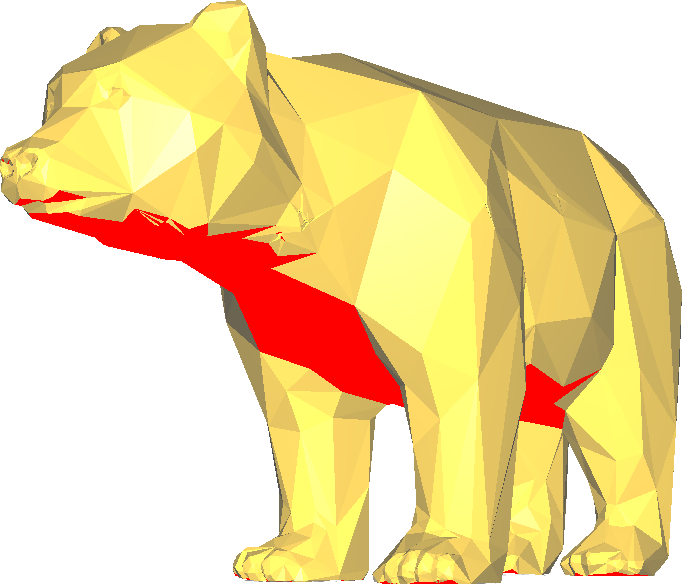
Standard supports are suitable for models that have larger overhangs with simpler shapes. They’re faster to print than tree supports, but use more material and can be harder to remove. They’re not suitable for very detailed models (like the one in the image).
Tree Supports

Tree supports are suitable for models that have many small overhangs that wouldn’t otherwise print. They’re more efficient than standard supports, but can be harder and slower to print. They can hold important areas without unnecessarily touching other parts of the model (which means they leave fewer print defects).

Důležité:
For today’s exercise, download both general configuration files for OrcaSlicer (for Voron and Hybrix). If you have them downloaded from previous exercises, you need to download an updated version and import them again. Links can be found in the configuration section of the printing tutorial.
Varování:
Follow all safety rules from the printing exercise. Especially don’t eat superglue and don’t disassemble the printer power supply plastic cover.
Tasks
What Can It Do? (2 points)
Your task for two points is to prepare or find a suitable test model on which you’ll verify how large overhangs the printer prints without problems without support.
You can use, for example, the Thingiverse.com or Printables.com portal and search for "overhang test".
In case of Thingiverse.com portal outage, we have some models available here as well:
- Overhang Test by Gregori Max (CC BY 3.0): RR_Uberhangtest.stl
- Overhang Test by Knickohr (CC BY 3.0): Overhang_Test.stl
- Remixed Mini Overhang test by Adam Gibson (CC BY 3.0): mini_overhang_test.stl
Instructions
- Since you downloaded a model from the Internet, you should first check the mesh correctness.
- Scale the model appropriately so you have time to finish the task; know, however, that a too small model may affect the test. Use the print time estimate in OrcaSlicer.
- First print the model without support; if necessary, stop printing at an appropriate time. If a failed print caused plastic stuck to the nozzle, CAREFULLY clean the nozzle using pliers. You must not touch it with your fingers or any other part of your body, nor damage the nozzle in any way. If you’re not sure, call an instructor.
- Decide whether standard or tree supports are more suitable for this model. Why? (You must explain to the instructor why you decided so. No answer is wrong as long as you can justify it.)
- Then set the support angle so the model can be printed, but with as little support as possible; print the model again. TIP: Use the layer-by-layer display in OrcaSlicer to check printability.
Důležité:
Before printing, always review the Gcode preview and check that support is actually located where you expect it.
Varování:
If the test model prints right the first time without supports, does it mean the printer prints anything, or that you performed an insufficient test?
How to Avoid Supports? (1 point)
Your task for one point is to print the bear without supports. You must cut it appropriately, print it, and then (optionally) glue it with superglue. For cutting you can use OrcaSlicer, which provides a powerful Cut tool.
Instructions
- For a longitudinal cut through the object, use the Cut button (rectangle icon with a dashed line) or the
Ckey. You want to keep both parts (Keep: Upper part, Lower part) and use the Place on cut option. If you want to cut in a plane other than XY, use - To rotate the object along an axis other than Z, use the object’s context menu (right-click on the object on the 3D tab).
Důležité:
Gluing is quite demanding; try to cut the bear into as few parts as possible.
Varování:
When working with glue, exercise increased caution and don’t damage classroom equipment.
Bonus Task (1 point)
Is it possible to print the bear without supports and without gluing? (Hint: what does the Add connectors button in the Cut dialog do?)
Points will be awarded for a printed bear without supports and without gluing that still holds together in one piece.
Cleanup (mandatory)
Those who don’t clean up after themselves don’t get any points.
Credits
Models appeared in images and tasks:
- Bear by Christophe Caranchini (CC BY-NC 3.0)
- Elegant Sea Turtle Sculpture by Oksus (CC BY-NC-ND 4.0)